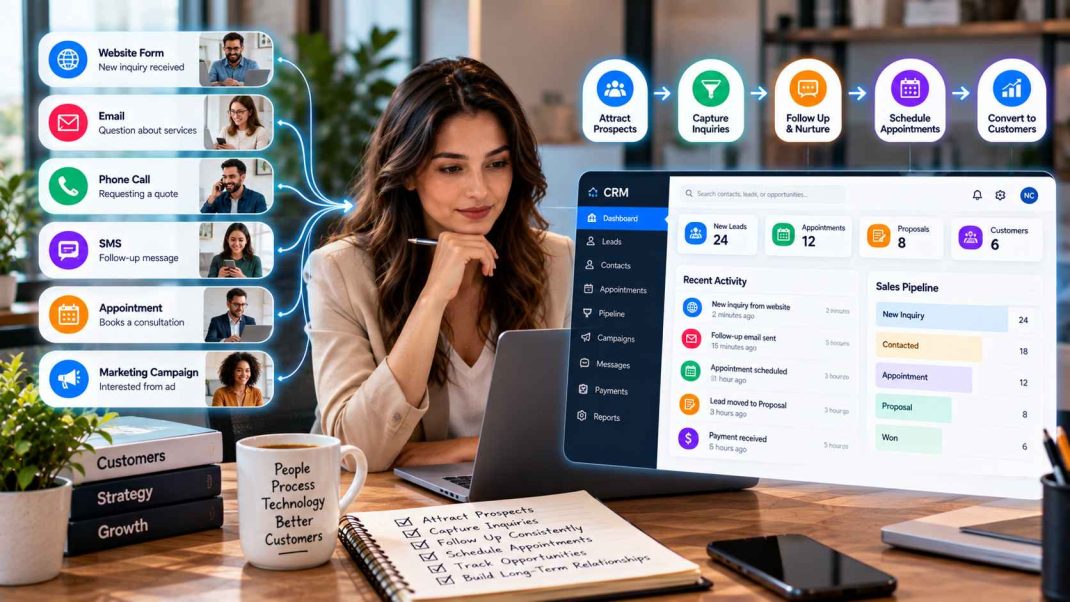
Customers rarely interact with a business through just one channel. A person might discover a company through its website, send an inquiry by email, receive a phone call from a sales representative, book an appointment online, and later receive a follow-up message.
For businesses, the challenge is making all of those interactions feel like parts of the same relationship.
When information is scattered across separate applications, employees may struggle to understand what has already happened. Customers may have to repeat information, while sales and service teams spend time searching through inboxes, spreadsheets, calendars, and messaging tools.
Customer relationship management technology, commonly known as CRM, can help bring those interactions into a more organized workflow.
What a CRM Actually Helps a Business Manage
At its simplest, a CRM provides a central place for managing information about prospects and customers.
That can include contact details, inquiries, sales opportunities, communication history, appointments, follow-up tasks, and other relevant customer information.
A CRM is not simply an electronic address book. It can connect customer information with the activities employees perform throughout the customer journey.
For example, a new prospect might enter the system through a website form. The inquiry can then be assigned to a salesperson, followed up by email or phone, moved into a sales pipeline, and eventually converted into a customer record.
A useful CRM should make it easier to understand what has happened, what is happening now, and what needs to happen next.
Salesforce’s CRM guide describes CRM technology as a way to manage interactions with current and potential customers while bringing customer and prospect information together across activities such as sales, marketing, and service.
Why Customer Information Becomes Fragmented
Fragmentation often happens gradually.
A small business might begin with email and a spreadsheet. Later, it adds an online form, an appointment scheduler, an advertising platform, an SMS service, and a separate sales tracking system.
Each tool may work perfectly well on its own. The difficulty comes from the gaps between them.
Imagine that a potential customer fills out a website form. The information arrives in an email inbox. An employee calls the prospect and records notes somewhere else. The appointment is then placed on a shared calendar. A marketing system sends a follow-up message, while the sales team maintains a separate spreadsheet to track the opportunity.
Nothing is necessarily wrong with any individual tool. The problem is that no single system provides a complete picture.
This can lead to duplicated work, missed follow-ups, outdated information, and uncertainty about who is responsible for the next step.
Connect Lead Capture With Customer Communication
A connected customer experience begins when an inquiry is captured.
A website form should not simply collect information and leave the business owner to figure out what happens next. Ideally, the inquiry should enter a process where the appropriate team member can see it, review the details, and take action.
The same principle can apply to inquiries arriving through advertising campaigns, landing pages, phone calls, or other channels.
Businesses can establish workflows that identify the source of the inquiry, record relevant details, notify employees, and create the next task.
For businesses exploring this approach, Client Drive is an example of a CRM and lead-generation platform designed to connect activities such as lead capture, follow-up, appointment scheduling, pipeline management, communication, payments, and analytics.
The benefit of connecting these activities is not simply having more software. It is having fewer gaps between one customer interaction and the next.
Use Automation Without Losing the Human Element
Automation can make a connected customer experience easier to maintain, but it needs to be used thoughtfully.
Some communication is predictable enough to automate. A new inquiry might receive an acknowledgement. An upcoming appointment might trigger a reminder. A sales representative might receive a notification when a new lead enters the system.
These tasks do not necessarily require an employee to perform them manually every time.
More complex communication is different.
A customer asking a detailed question, raising a concern, negotiating a significant purchase, or explaining a unique situation may need a human response.
The best use of automation is often to handle repetitive administrative work while allowing employees to concentrate on conversations that require judgment and personalization.
This distinction also matters for the customer experience. Automated communication should be relevant, timely, and transparent rather than creating the impression that a customer is communicating with a person when they are not.
Make Appointment Scheduling Part of the Process
Scheduling is often treated as a separate administrative activity, but it can be an important part of the customer journey.
Someone who has expressed interest in a service may need to schedule a consultation, demonstration, estimate, assessment, or sales call.
If scheduling requires several rounds of email, the process can become unnecessarily complicated.
Connecting scheduling with customer records can provide useful context. Employees can see why the appointment was created, what the customer previously requested, and what information has already been collected.
Automated reminders can also reduce routine administrative work.
The exact approach will vary by business. Some companies may allow qualified prospects to schedule immediately, while others may want an employee to review an inquiry before offering appointment times.
The important point is that scheduling should connect naturally with the rest of the customer journey.
Keep Sales Opportunities Visible
A CRM can also help businesses understand where prospects are in the sales process.
Instead of keeping every opportunity in an inbox, businesses can organize prospects into stages that reflect their actual workflow.
For example:
New Inquiry → Qualified → Contacted → Appointment → Proposal → Customer
The stages can be adapted to the business.
A professional services company may have discovery calls and proposals. A home improvement company may need estimates and site visits. A technology company might use demonstrations and contract discussions.
The purpose is visibility.
When a team can see which opportunities are new, which require follow-up, and which are close to a decision, it becomes easier to prioritize work.
It also reduces the risk of an opportunity disappearing simply because an email was overlooked.
Use Analytics to Understand Customer Activity
Connected customer information can also help businesses evaluate their processes.
Instead of looking only at the number of new inquiries, businesses can examine what happens afterward.
Questions might include:
- Which sources generate inquiries?
- How many leads receive timely follow-up?
- How many appointments are scheduled?
- Where do prospects commonly stop progressing?
- How long do opportunities remain in each sales stage?
- Which campaigns or services generate meaningful interest?
These questions can reveal problems that are difficult to see when information is spread across multiple systems.
For example, a business might discover that it is generating plenty of inquiries but has a bottleneck during follow-up. Another company might find that appointments are being scheduled successfully but too few opportunities move to the proposal stage.
The purpose of analytics is not simply to produce more reports. It is to help businesses understand where the customer journey can be improved.
How Integrated CRM Platforms Can Simplify the Workflow
As businesses grow, the number of customer interactions usually grows with them.
A company may eventually need marketing campaigns, lead capture, sales management, communication tools, appointment scheduling, payment processes, and reporting.
Managing every function independently can create additional administrative work.
An integrated CRM can provide a common environment where these activities are connected.
For example, Client Drive’s integrated CRM platform can bring lead generation, customer management, communication, appointment scheduling, pipeline activity, payments, and analytics into a connected workflow.
That does not mean every business needs every available function. The right system depends on the company’s size, customer journey, sales process, and operational requirements.
The more important principle is to design technology around the way customers actually interact with the business.
Building a More Connected Customer Experience
A connected customer experience does not require every interaction to be automated or every business process to be handled by one application.
It requires continuity.
When a customer moves from a website inquiry to a conversation, from a conversation to an appointment, and from an appointment to a purchase, each stage should build on the information collected previously.
CRM technology can provide the structure behind that process.
The most effective implementation is usually one that makes life easier for both sides: employees have the context they need to work efficiently, while customers receive communication that feels timely, relevant, and consistent.
Technology cannot replace good customer service. It can, however, give businesses a better foundation for delivering it.
